System Components
Main Unit
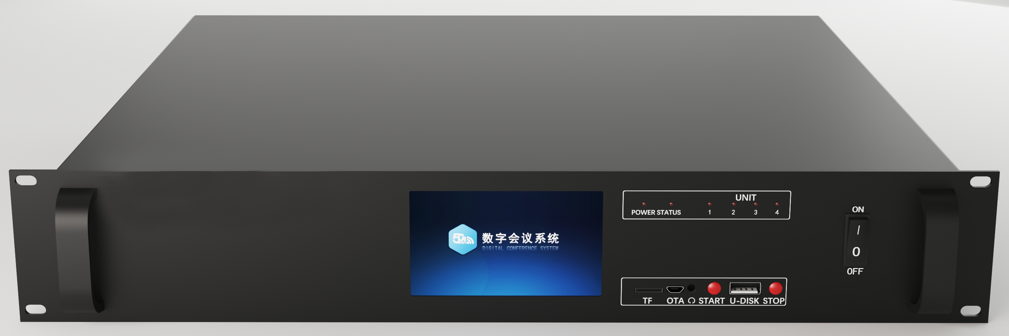
Front Panel
| No. | Name | Description |
|---|---|---|
| 1 | POWER Power Indicator | - Powered on: indicator constantly on- Powered off: indicator off |
| 2 | STATUS Status Indicator | - Normal operation: indicator flashes at 1-second intervals- Abnormal operation: indicator stops flashing- System expired: indicator flashes at 2-second intervals |
| 3 | UNIT Wired Microphone Access Indicator | - When wired microphone connected: corresponding channel indicator flashes |
| 4 | ON/OFF Switch | - Power on/off master key |
| 5 | TF Card Slot | - For display firmware upgrade |
| 6 | OTA | - For main unit firmware upgrade |
| 7 | START | - Conference recording start key |
| 8 | U-DISK | - USB drive for conference recording storage |
| 9 | STOP | - Conference recording stop key |
Product images are for reference only; please refer to actual product.
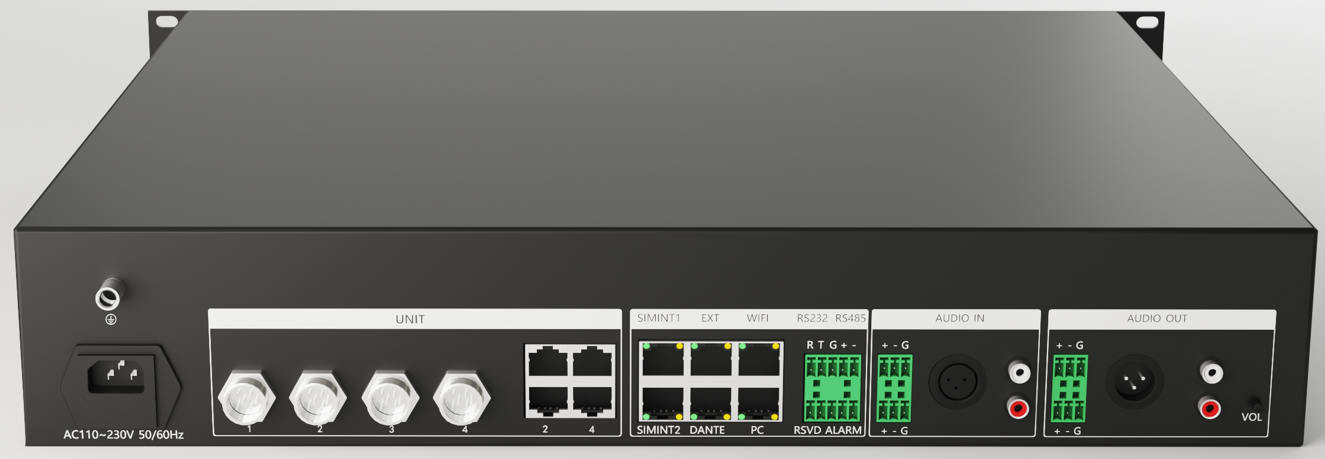
Rear Panel
| No. | Name | Description |
|---|---|---|
| 1 | AC220 Power Interface | - 220V power interface |
| 2 | Ground Terminal | - Ground terminal |
| 3 | UNIT1~4 | - Wired microphone 1~4 channel aviation connectors; controlled via LCD display to select between aviation connector and network port |
| 4 | - Wired microphone 1~4 channel network connectors; controlled via LCD display to select between aviation connector and network port | |
| 5 | SIMINT1 | - Reserved |
| 6 | SIMINT2 | - Reserved |
| 7 | EXT | - Expansion interface/simultaneous interpretation interface |
| 8 | DANTE | - DANTE interface |
| 9 | WIFI | - Connect to wireless router/AP/POE switch LAN port (wireless or wireless+wired microphone scenarios)- Connect to control computer network port (pure wired microphone scenario) |
| 10 | PC | - Connect to control computer network port (not yet enabled) |
| 11 | RS232 | - Used when connecting single camera |
| 12 | RSVD | - Reserved interface |
| 13 | RS485 | - Used when connecting single/multiple cameras |
| 14 | ALARM | - Alarm interface (phoenix terminal rightmost 2 pins) |
| 15 | AUDIO IN | - Phoenix terminal: balanced audio input |
| 16 | - XLR connector: balanced audio input | |
| 17 | - RCA connector: unbalanced audio input | |
| 18 | AUDIO OUT | - Phoenix terminal: balanced audio output |
| 19 | - XLR connector: balanced audio output | |
| 20 | - RCA connector: unbalanced audio output | |
| 21 | HDMI IN/OUT | - Matrix expansion board (optional) |
| 22 | AUDIO OUT MULTI | - Audio 16-zone expansion board (optional) |
Product images are for reference only; please refer to actual product.
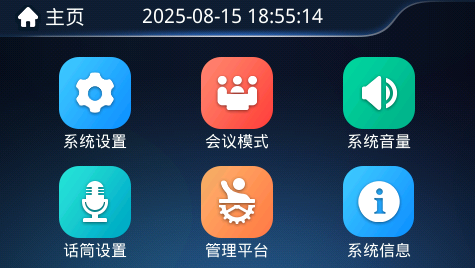
Main Unit Display
Main unit display interface description:
| No. | Name | Description |
|---|---|---|
| 1 | System Settings | - When console connects to main unit, main unit synchronizes time with console's computer or tablet- Time can also be set via "System Settings" → "Time Settings" |
| 2 | Conference Mode | - Set conference mode and maximum number of speakers |
| 3 | System Volume | - Set system volume and EQ parameters |
| 4 | Microphone Settings | - Microphone settings, wired microphone channel settings, microphone diagnostics |
| 5 | Management Platform | - Main unit backend, console, management platform |
| 6 | System Information | - System status information |
Wireless Microphone
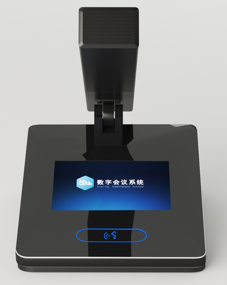
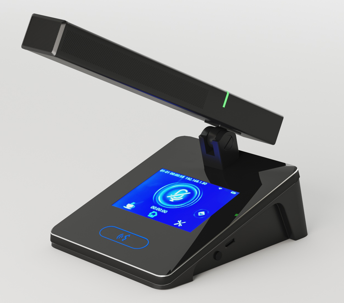
Three Views
Microphone side button description (from left to right):
| No. | Name | Description |
|---|---|---|
| 1 | Power Button | - Single press: microphone powers on- Long press or double press: microphone powers off |
| 2 | TYPE-C | - 18W fast charging interface, can reverse fast charge mobile phones |
| 3 | Fast Charging Indicator | - When connected to fast charging power source, indicator constantly on |
Product images are for reference only; please refer to actual product.
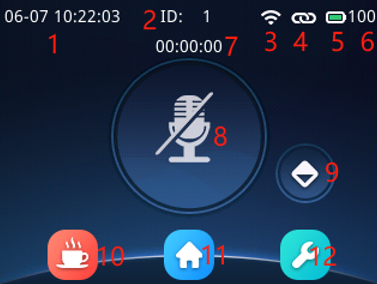
Microphone Display
Microphone display interface description:
| No. | Name | Description |
|---|---|---|
| 1 | Current Time | - After microphone connects to main unit, it synchronizes and updates with the main unit's latest time |
| 2 | Microphone ID | - Can be modified via ID assignment function |
| 3 | Network Connection Status | - Wireless microphone: indicates wireless signal strength- Wired microphone: displays full signal when valid network cable connected |
| 4 | Main Unit Connection Status | - Connected: connected to main unit- Disconnected: unable to communicate with main unit |
| 5 | Battery Indicator | - Wireless microphone: indicates actual battery level- Wired microphone: displays full battery when valid network cable connected |
| 6 | Battery Value/Available Time | - Displays battery percentage- Displays available time (minutes) |
| 7 | Timed Speaking/Limited Speaking | - Timer starts after speaking begins- In limited speaking mode, exits speaking when time expires (chairman not affected) |
| 8 | Speaking | - Displays microphone switch status |
| 9 | Chairman Priority | - Chairman priority (not available on non-chairman microphones) |
| 10 | Service Menu | - Call for tea, paper, pen and other services |
| 11 | HOME | - Return to home page (current page) |
| 12 | Settings | - Enter settings menu |
When network disconnects or main unit shuts down (default 10 minutes), microphone will automatically power off.
Wired Microphone
Three Views
Microphone side button description (from left to right):
| No. | Name | Description |
|---|---|---|
| 1 | Audio Interface | - Can connect headphones for playing venue sound (optional) |
| 2 | TYPE-C | - Debug/upgrade, can provide external power for mobile phone charging, etc. |
| 3 | Button | - Hold and power on to restore microphone factory settings |
Product images are for reference only; please refer to actual product.
Microphone Display
Similar to Wireless Microphone Display, not repeated here.
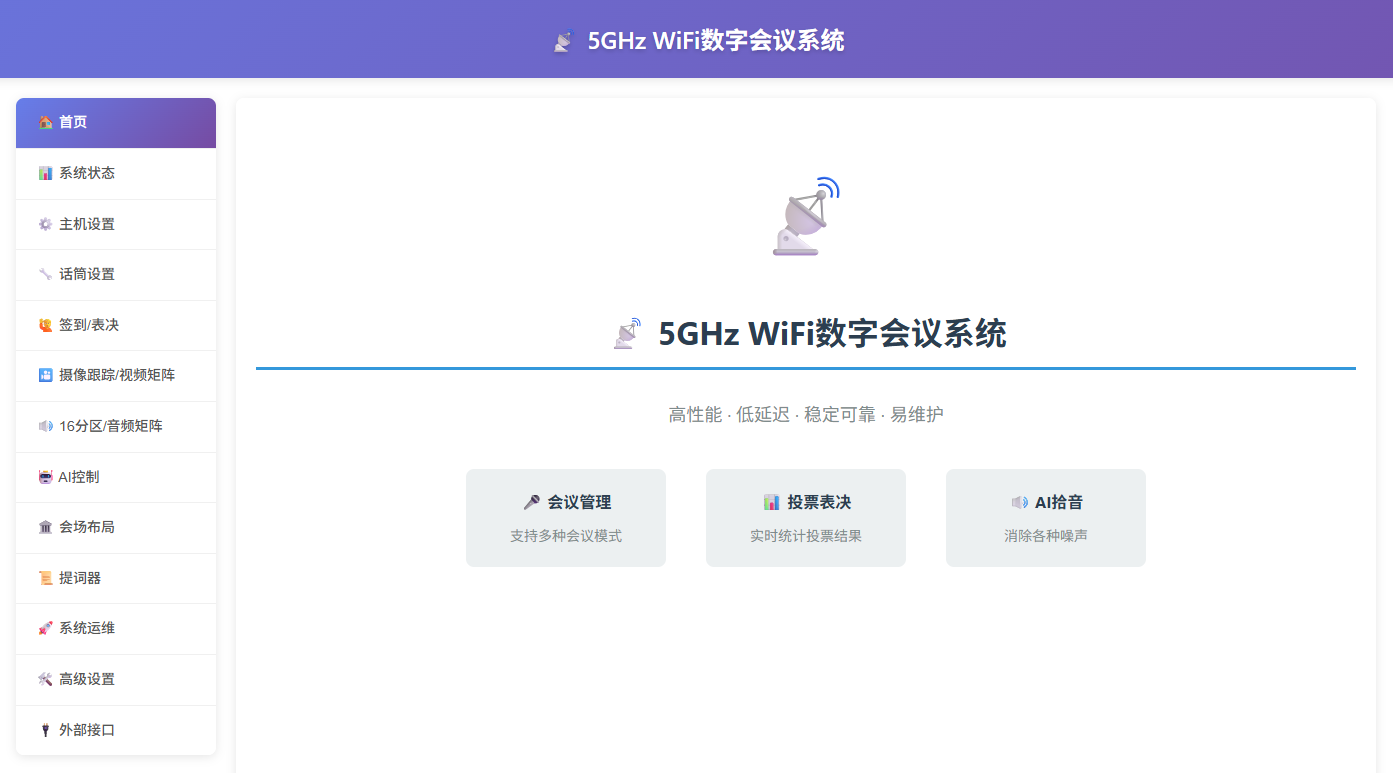
Main Unit Web Interface
Users: - Service personnel - Installation personnel - Conference administrators Features and Characteristics:
- Supports cross-platform access;
- Used as control terminal when the main unit is not in the same room;
- Device configuration, status query, check-in, voting, and polling;
- Used as control terminal when the main unit is not in the same room (e.g., when setting camera tracking);
- Used for ID assignment, batch settings, and OTA upgrade of the main unit and microphones;
- Used for camera tracking settings;
- Administrator operations;
- Supports multiple languages; Access Method:
- After the computer/tablet/main unit is on the same network, open a browser and visit
http://192.168.10.111;
- For pure conference discussion scenarios, using main unit + microphone alone is sufficient; this software is not required.
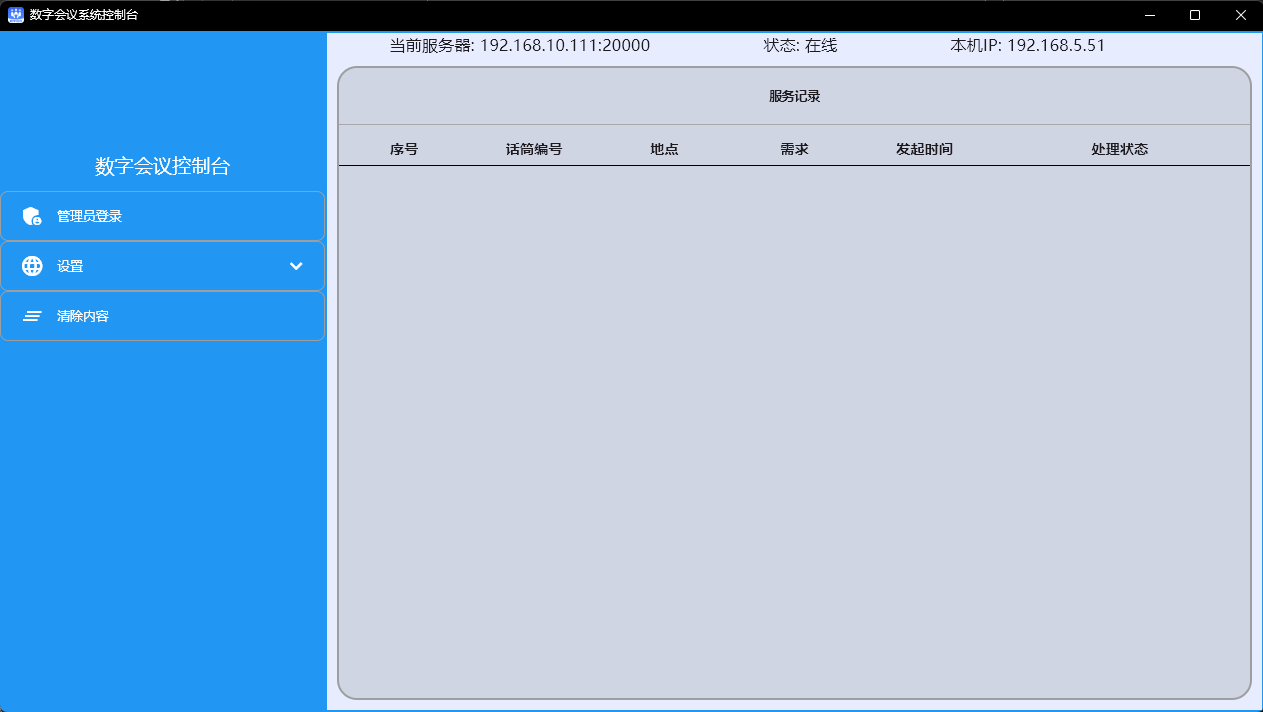
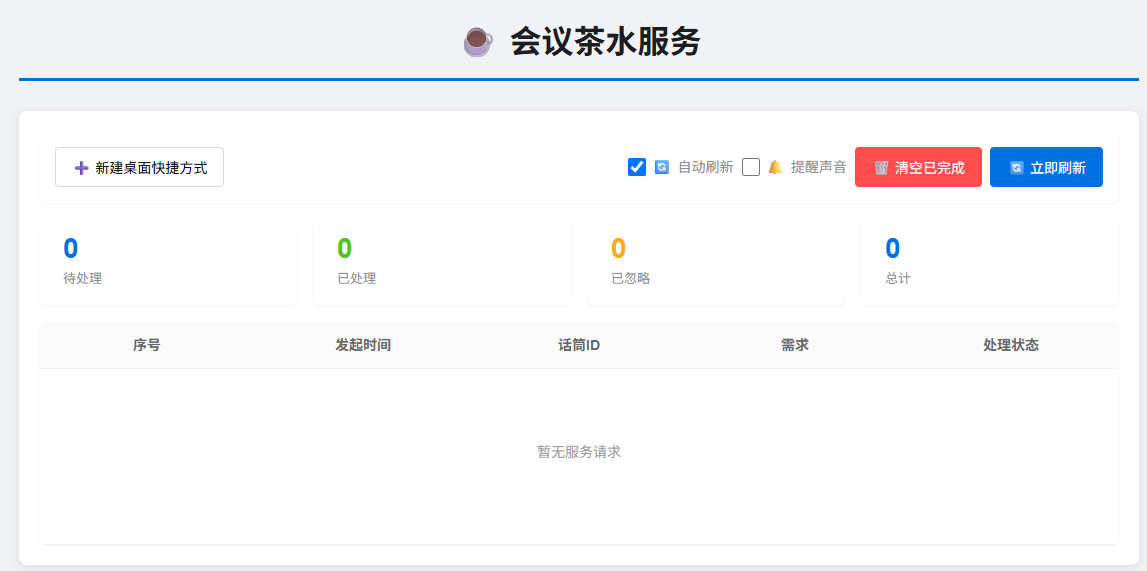
Beverage Service Server
Abbreviation: service Users: - Conference service personnel - Conference administrators Features and Characteristics:
- Supports cross-platform deployment, currently supports Windows (Server, 7, 10, 11), Android, UnionTech, Kylin and other clients;
- Can be used as a standalone beverage service terminal;
- Supports multiple languages; Access Method:
- After the computer/tablet/main unit is on the same network, open a browser and visit
http://192.168.10.111/service.html;
- For pure conference discussion scenarios, using main unit + microphone alone is sufficient; this software is not required.
Console
Abbreviation: console Users: - Service personnel - Installation personnel - Beverage service personnel - Conference administrators Features and Characteristics:
- Supports cross-platform deployment, currently supports Windows (Server, 7, 10, 11), Android, UnionTech, Kylin and other clients;
- Can be used as a standalone beverage service terminal;
- System O&M, batch OTA upgrade of wireless and wired microphones;
- Conference monitoring and recording;
- Supports multiple languages; Access Method:
File Server\Console\;
- For pure conference discussion scenarios, using main unit + microphone alone is sufficient; this software is not required.
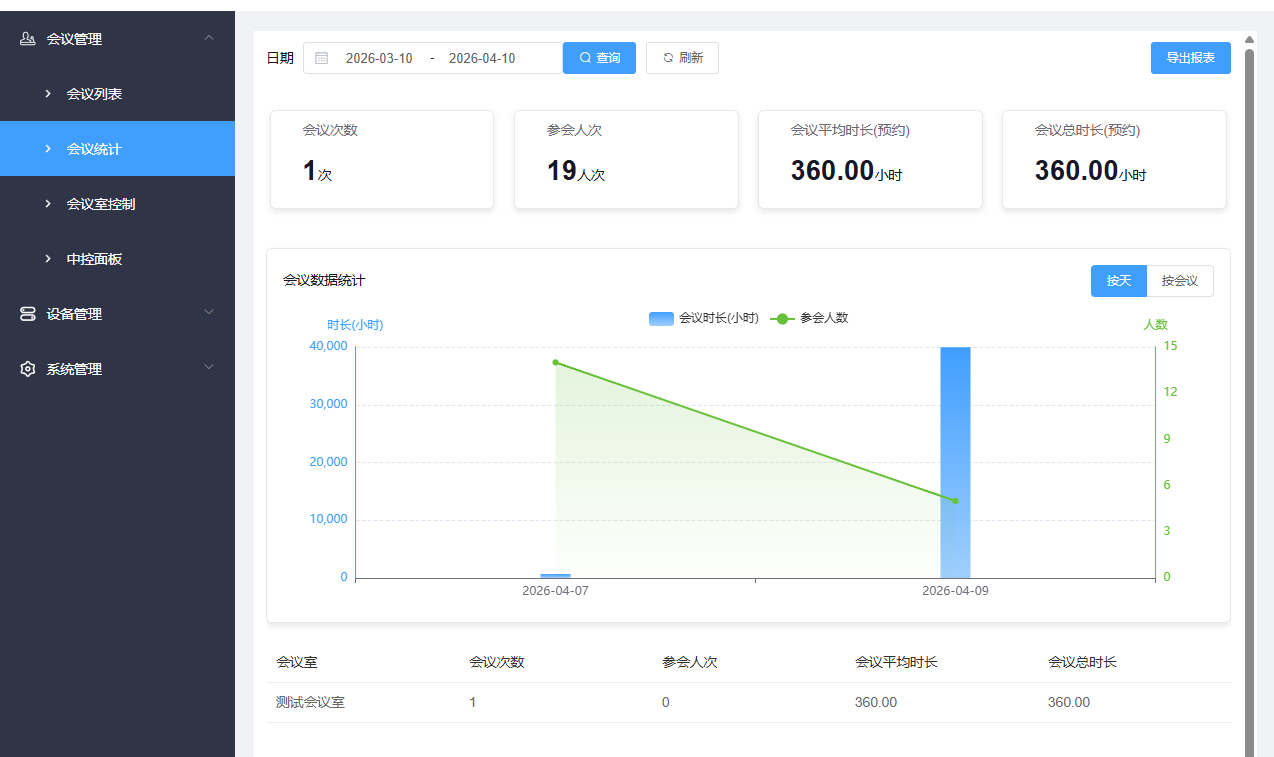
Conference Management Platform
Abbreviation: CMP - Conference Management Platform Users: - Service personnel - Conference administrators Features and Characteristics: - Supports cross-platform deployment, currently supports Windows, Android, UnionTech, Kylin and other clients - Cooperates with main unit and microphones to implement check-in, voting, voting and other functions - Implements full conference process management - Supports multi-device access, including but not limited to: 5G conference system, paperless conference terminals, information display terminals, beverage terminals, screen casting terminals, etc. - Supports SDK secondary development, supports integration with Enterprise WeChat, DingTalk, OA and other third-party systems Access Method:
File Server\Conference Management Platform\;
For pure conference discussion scenarios, using main unit + microphone alone is sufficient; conference management platform is not required.